
By Phillip Martinez
Writer
0
Share
Newsweek is a Trust Project member
See more of our trusted coverage when you search.Prefer Newsweek on Googleto see more of our trusted coverage when you search.
Cloud Save is one of the biggest features of the new Nintendo Switch Online service. The ability to backup your save files to make room on your Switch for other titles is an ideal solution for storing the massive amount of games offered on the hybrid console. It's also the best way to keep your save files if your Switch is lost, stolen or broken.
While backing up your save files in the Nintendo Switch Online Cloud is pretty straightforward, here's how to do it and enable (or disable) the automatic function.
HOW TO BACKUP YOUR SAVES
Read More on Science
After you've updated your Switch to version 6.0, games that are compatible with Cloud Saves (sorry, Splatoon 2) will backup automatically. However, if you want to be sure they are being saved you can follow these steps.
- Press the Plus button over the game you want to back up.
- Scroll down to the "Save Data Cloud Backup" option.
- Select the account that has the save data.
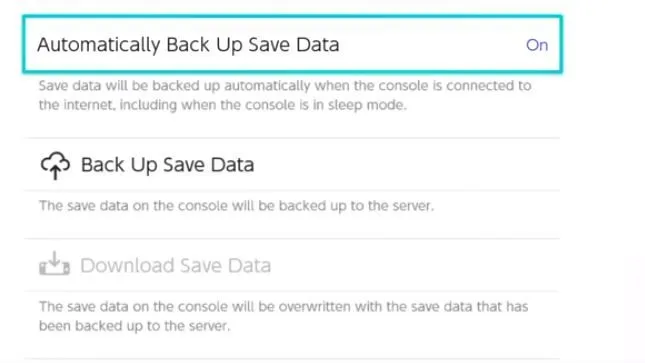
- The next screen will have options to "Automatically Back Up Save Data" for that title, but below that a "Back Up Save Data" option is available. Select this to start backing up your data.
It should be noted that the larger the save file the longer it takes to transfer to the cloud.
...
HOW TO ENABLE/DISABLE CLOUD SAVES
Again, Nintendo Switch titles that can use the Cloud Saves feature will automatically backup the data. The cloud saves this data when the Switch is connected to the internet and in Sleep Mode.
To enable or disable cloud saves, you can go to the specific software's options from the home menu like the last section says. But you can do a mass enabling or disabling of the cloud saves through another way.
- Go to System Settings
- Select "Data Management"
- Select "Save Data Cloud Backup"
- Select the user
- The next page will have the Automatically Backup Save Data option turned on. You can select this to turn off the automatic save.
Pressing the X button on this page will bring players to another page where they can mass enable or disable the Cloud Save feature. Press Y to enable Cloud Saves and X to disable them.
Again, these steps are self-explanatory but it should be noted that if you cancel your membership to the service, or it expires, Nintendo doesn't guarantee your cloud saves will be there if you sign back in.
How are you liking the Nintendo Switch Online service so far? Let us know your thoughts in the comments section below.
View 0 Comments
Submit Correction
View Editorial & AI Guidelines